All About API Hacking
A practical tour of API testing: recon and endpoint discovery, documentation and mass assignment, BOLA and broken authentication, rate limiting, and where to practise it safely.
Lets get started on API Hacking.
API Recon
First step includes Gathering as much as information about the API as possible. Look for API Endpoints where the actual calls to the server is been made.
For Example,
/api/users > retrieves a list of users /api/users/jogi > retrieves that particular user
To find these API Endpoints, APIs are usually documented so that developers know how to use and develop applications with them. If API Documentation is available, always start your recon reviewing it first.
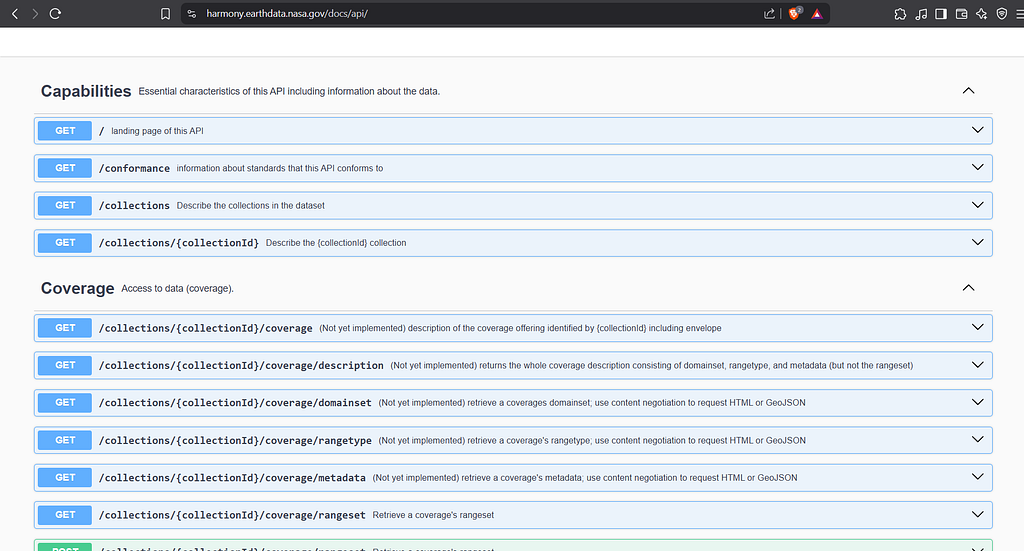
You may also be able to use a specialized tool to test the documented endpoints, such as Postman. Postman is a must learn tool for API testing. For me, I use Burpsuite (my man) and Postman both.
Learn Burpsuite and Postman!
Discovering API Endpoints
If API Documentation isn’t publicly available, you can crawl the application, you can do this manually or by using tool for crawling (Burp or Postman, which you have to do anyways). You can also use Katana, waybackurls, gau or any other tool for URL Collection.
After you find some intial endpoints, you can use Burp’s Intruder for hidden endpoints or use fuff, feroxbuster or any fuzzing tool.
For example you find,
/api/user/update
you might want to fuzz,
/api/user/FUZZ
While doing recon you may find some hidden parameters that API supports. To find Hidden Parameters on the Endpoints to change and see their behavior (Tools: Arjun, ParamSpider>BApp).
/api/user?id=123
id > is the parameter, we want to fuzz that for more (hidden) parameters
/api/user?FUZZ=123
Arjun is the automated fuzzer for hidden parameters so just run,
$ arjun -u https://xxxxx.com/api/user?id=123
You should also look out for Javascript files because they contain some API calls aren’t directly triggered from the browser.
Once you’ve identified the endpoints interact with them to discover attack surface.
Interacting with API endpoints
You could investigate how the API responds to changing the HTTP method and media type. (I’ll assume you know what each http method does).
An API endpoint may support multiple HTTP methods so its important to test all the possible methods and review the error messages or responses closely so that you can understand how to construct a valid API request for the attack.
API endpoints often expects data in a specific format, changing the content-type through the Content-Type Header (and changing the response body accordingly) we can get bypass flawed defenses or maybe the application is secure for only that specific content type.
Play around with them, pass unexpected values and see how the application responds.
That’s all for the Recon Phase! We’ll move to vulnerabilities now.
Mass Assignment Vulnerabilities
Mass Assignment or Auto-Binding creates hidden parameters.
What is mass-assignment, It’s when the application framework automatically binds user-supplied input (like request parameters) to object properties (like model fields) without proper filtering or access control. Mass assignment may therefore result in the application supporting parameters that were never intended to be processed by the developer.
For example,
consider a POST /api/users/update request, which enables users update information, and includes the following JSON:
{
“username”: “Jogi”, “email”: “jogi@xxxxx.com”,
}
A GET request to /api/user/1 returns this response:
{
“id”: 1, “name”: “Jogi”, “email”: “jogi@xxxxx.com”, “is_admin”: “false”
}
This may indicate that the hidden ‘id’ and ‘is_admin’ parameters are bound to the internal user object.
To verify if the enumerated ‘is_admin’ parameter can be manipulated, include it in the POST request. Then, attempt to exploit the potential vulnerability by setting the ‘is_admin’ parameter to ‘true’ and sending the request.
{
“username”: “Jogi”, “email”: “jogi@xxxxx.com”, “is_admin”: true,
}
If the ‘is_admin’ value in the request is assigned to the user object without proper validation or sanitization, the user ‘Jogi’ could be mistakenly granted administrative privileges.
Server-Side Parameter Pollution
Some websites use internal APIs that aren’t open to the public. Server-side parameter pollution happens when the website includes user input in a request to one of these internal APIs without properly handling it. This can let an attacker add or change parameters.
To check for this issue, try adding characters like ‘#’, ‘&’, or ‘=’ in your input and see how the website reacts.
You can use a URL-encoded ‘#’ character to truncate the server-side request.
For example,
GET /profile?user=1001%23//evil.com OR %26role=admin
(URL Encoded: %23># and %26>&)
You can use an URL-encoded ‘&’ character to add a second parameter.
For example,
GET /profile?user=1001%26admin=true
To confirm whether the application is vulnerable to server-side parameter pollution, you could try to override the original parameter. The impact of this depends on how the application processes the second parameter. This varies across different web technologies.
For example:
GET /profile?user=1001%26user=2121
- PHP parses the last parameter only. This would result in a user search for second parameter.
- ASP.NET combines both parameters. This would result in a user search for both parameters, which might result in an ‘Invalid username’ error message.
- Node.js / express parses the first parameter only. This would result in a user search for first parameter, giving an unchanged result.
If you’re able to override the original parameter, you may be able to conduct an exploit. For example, you could add ‘name=admin’ to the request. This may enable you to log in as the administrator user.
In REST APIs
A RESTful API may place parameter names and values in the URL path, rather than the query string.
Consider an application that enables you to edit user profiles based on their username. Requests are sent to the following endpoint:
GET /edit_profile.php?name=jogi
This results in the following server-side request:
GET /api/private/users/jogi
An attacker may be able to manipulate server-side URL path parameters to exploit the API. To test for this vulnerability, add path traversal sequences to modify parameters and observe how the application responds.
You could submit URL-encoded ‘jogi/../admin’ as the value of the ‘name’ parameter:
GET /edit_profile.php?name=jogi%2f..%2fadmin
This may result in the following server-side request:
GET /api/private/users/jogi/../admin
Authorization Vulnerabilities
Authorization NOT Authentication.
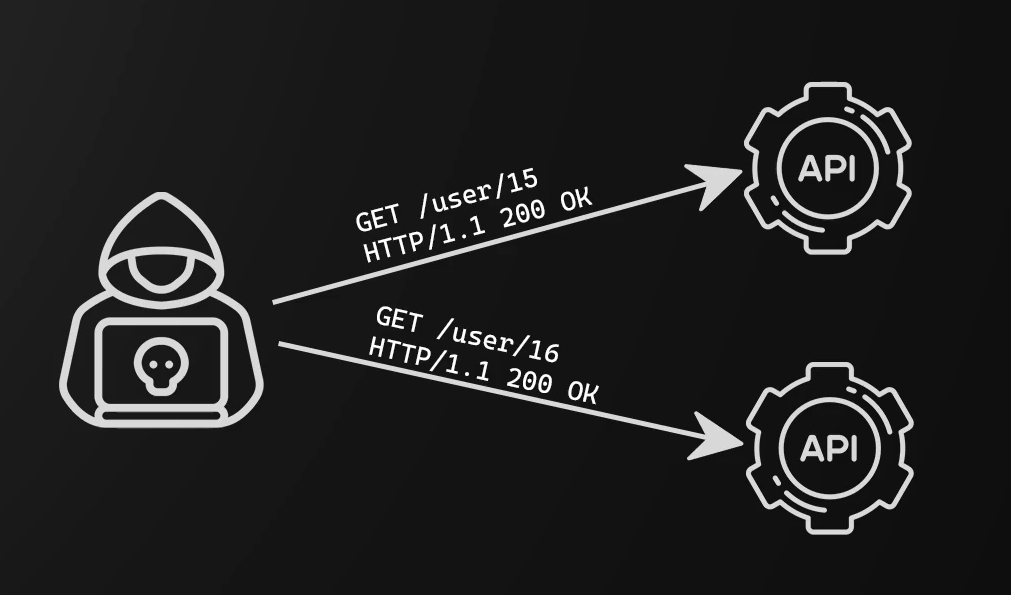
BOLA (Broken Object Level Authorization): BOLA occurs when an application fails to properly verify that the user is allowed to access or modify a specific object/resource, such as another user’s data.
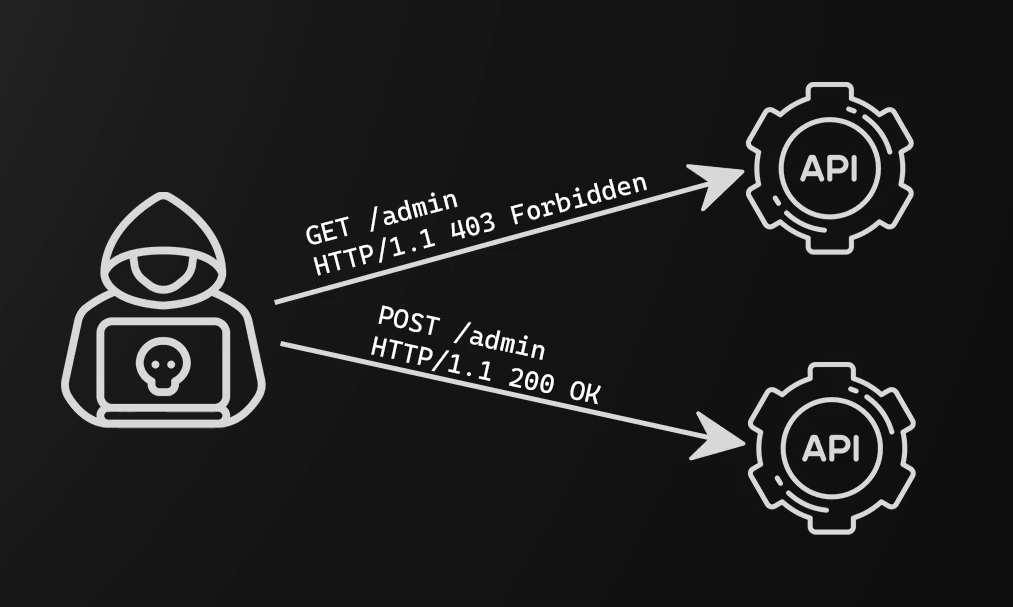
BFLA (Broken Function Level Authorization): BFLA happens when an application exposes privileged functions (admin-only actions), but doesn’t check if the user has permission to perform them.
Now these might sound a little bit confusing. So let’s talk through an example.
If we have a web shop and let’s say you go to your account page and it says, ‘/user/ID’. If I change this ID to the ID of another user and I can access their information, this is BOLA (Broken objects level Authorization).
Within the same web shop, if I can carry out functions such as ordering on another user’s behalf or accessing administrative functionality, this is BFLA (Broken Function Level Authorization).
So try to think of BOLA as access to objects referenced by their ID, such as a user ID or a GUID or something like this and try to think of BFLA as access to functionality that you shouldn’t have access to.
Authentication Vulnerabilities
In APIs, there are few different methods of authentication that we need to know about:
- HTTP Basic Authentication: It sends the username and password with each request encoded in Base64, using the Authorization header.
- Bearer Tokens: Client gets a token from an authorization server, then uses it in requests.
- JWT Tokens: A signed token (often using HMAC or RSA) contains claims like user ID and role. Used with Bearer scheme.
- API Keys: The client includes a unique API key in the request header or query string.
Attacks on Authentication:
Most basic, bruteforcing. Lets move on to next one.
Attacking Tokens:
Doing Burp Sequencer check on the cookie randomness and crafting a new admin cookie if its not very random.
Attacking JWT Tokens:
A JWT Token consists of three parts, separated by dots (.): HEADER.PAYLOAD.SIGNATURE
for example,
eyJhbGciOiJIUzI1NiIsInR5cCI6IkpXVCJ9. eyJ1c2VySWQiOiIxMjM0Iiwicm9sZSI6ImFkbWluIn0. SflKxwRJSMeKKF2QT4fwpMeJf36POk6yJV_adQssw5c
All these is encoded in base64.
Tools: jwt.io > paste your token for better view
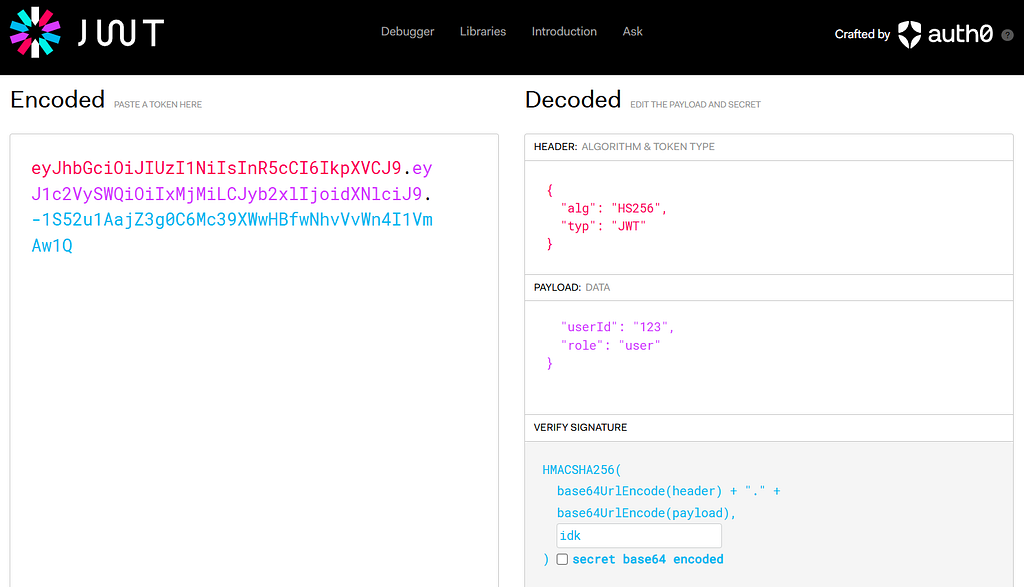
Header: Describes the token type and the algorithm used to sign it. Payload: Contains the actual data, like the user’s ID and role. Signature: Cryptographic signature that proves the token wasn’t tampered with. JWT can be signed with symmetric or asymmetric encryption.
The token is passed like this in the request:
Authorization: Bearer <JWT-Token>
Now tempering with the token results in error with if don’t know the secret.
One way to get the secret is to crack it using hashcat or jwt_tool.
$hashcat -a 0 -m 16500 [token] [wordlist] — show
using jwt_tool,
jwt_tool -t [url] -rh [authorisation_header] -M at
refer: https://github.com/ticarpi/jwt_tool/wiki
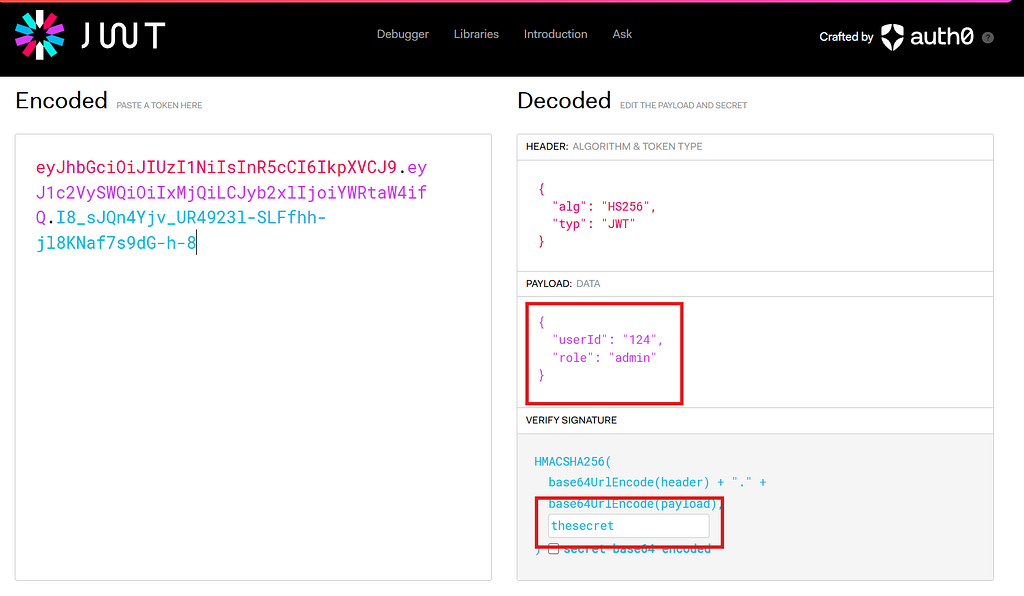
Another way includes seaching for the secret in the javascript files discovered in the recon phase. Sometimes the secret is hardcoded in the variables by the developer.
let’s say you got the secret by following one of these methods, you can craft a token for like admin privileges by modifying the payload section.
Other Vulnerabilities to Consider
SQL Injection, it occurs when user input is included directly in a SQL query without proper validation or escaping. Attackers can manipulate the input to run malicious SQL commands on the database.
For example,
Vulnerable query: SELECT *FROM users WHERE username = ‘admin’ AND password = ‘1234’;
- *If an attacker enters:
- *Username: admin’ — Password: anything
- *The query becomes:
- SELECT FROM users WHERE username = ‘admin’ — ‘ AND password = ‘anything’; bypassing the password check. NoSQL Injection is similar, but it targets NoSQL databases like MongoDB, which often use JSON-based queries. If user input is inserted unsafely into the query, attackers can inject objects to manipulate behavior.
For example,
Vulnerable query db.users.find({ “username”: inputUsername, “password”: inputPassword }) If the attacker sends:
{
“username”: { “$ne”: null }, “password”: { “$ne”: null }
}
It becomes: db.users.find({ “username”: { “$ne”: null }, “password”: { “$ne”: null } }) This will return all users, bypassing login authentication. Sensitive Data Exposure happens when a web application inadvertently reveals personal, financial, or security-related information, either in transit, in storage, or through poor handling. This can occur without any hacking, just because data isn’t properly protected.
For example,
Exposed password in plain text:
GET /api/user/1
{
“id”: 1, “name”: “jogi”, “email”: “jogi@xxxxx.com”, “password”: “ilikemen”
}
SSRF (Server-Side Request Forgery) allows an attacker to make the server send HTTP requests on behalf of the attacker, usually to internal or private systems that the attacker cannot access directly.
For example,
GET /fetch?url=http://xxxxx.com
The attacker can send,
/fetch?url=http://localhost:8080/admin
The server makes a request to localhost/admin (on its own system), potentially revealing internal content.
The End
I hope you learned something from this. I use these for my personal notes and decided to share them with everyone.
I tried to cover as much as I could. I did not cover much practical stuff, you can perform hands-on on these platforms:
https://github.com/OWASP/crAPI (Recommended)
https://portswigger.net/web-security (Recommended)
OWASP Juice Shop | OWASP Foundation
Look for labs on Tryhackme or HackTheBox for the API Hacking.
Thank You!
Written byGhostVirus